Track your 183 days in Puerto Rico
and the proof behind them
The complete Puerto Rico Act 60 residency record: automatic day-counting, your closer-connection evidence, every kind of day, and a CPA-ready report. Built to survive an audit.
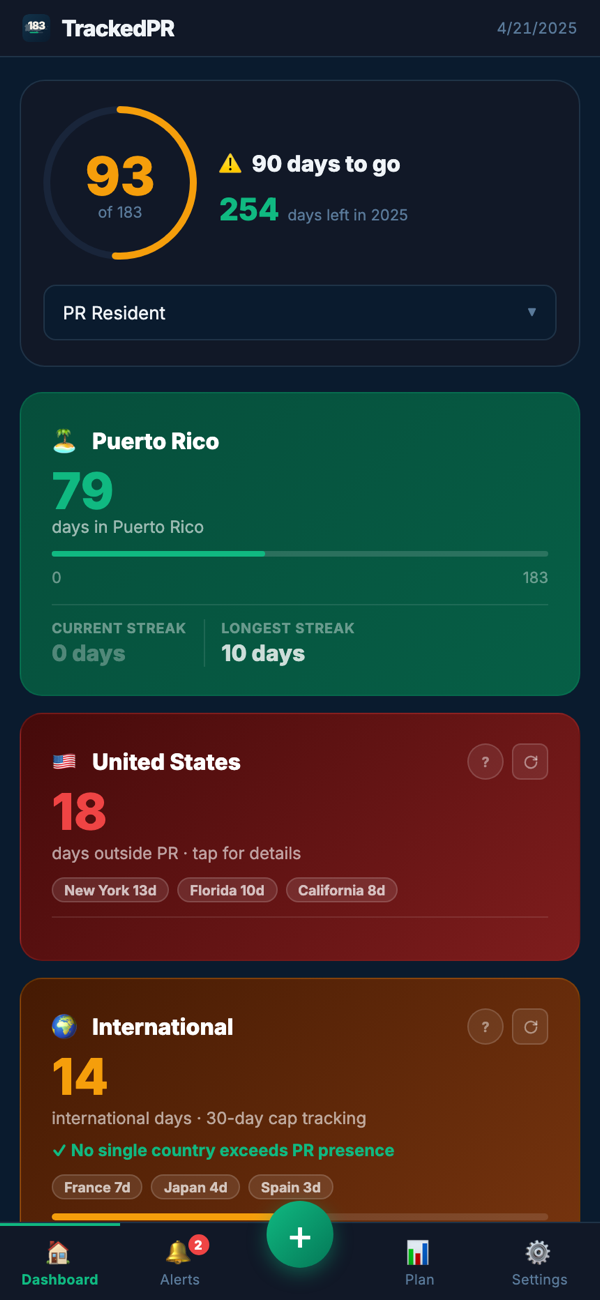
Every kind of day, counted right
The 183-day test, the 3-year alternative, and student mode, plus the days other apps miss: sick days, hurricane and disaster days, and the international days that still count toward your 183. See exactly where you stand at a glance.
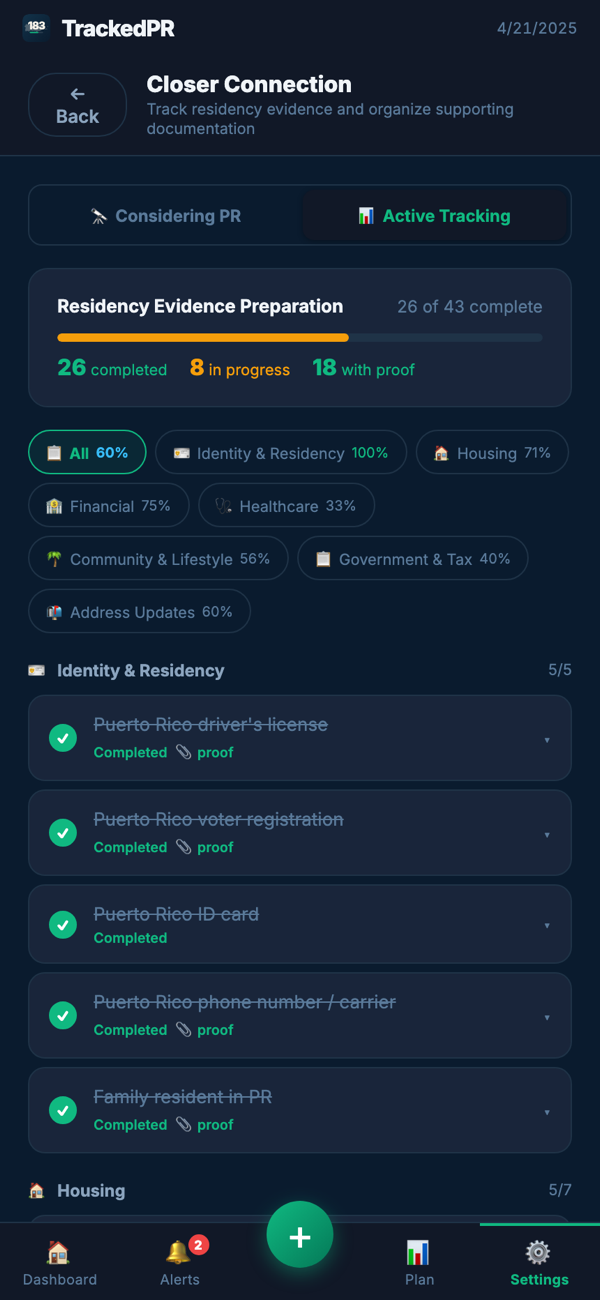
Build the case behind the count
Every automatically logged day arrives already stamped with the place resolved to the city and the local time you were detected there, and that stamp travels into your report on its own. Attaching a boarding pass or receipt adds a second layer on top of it, and your closer-connection file builds alongside. The count and the evidence for it arrive together.
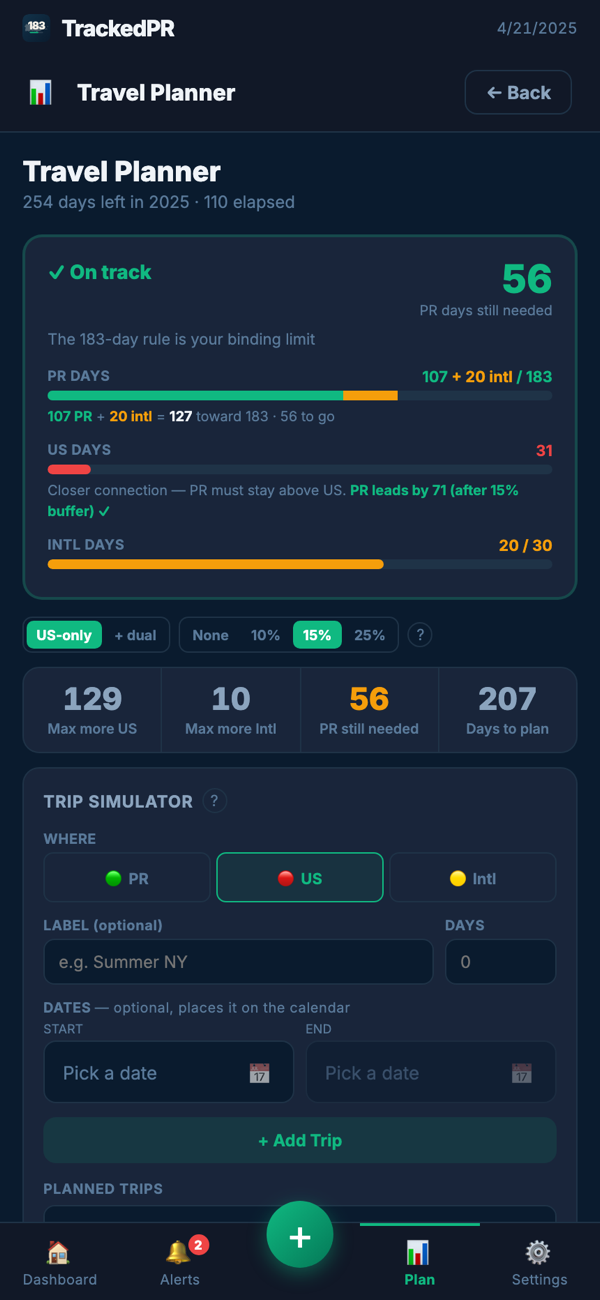
Plan trips before they cost you
See how a trip affects your 183 before you book it, and start planning your residency before you've even moved to the island. Then hand your CPA a clean, branded report in one tap.
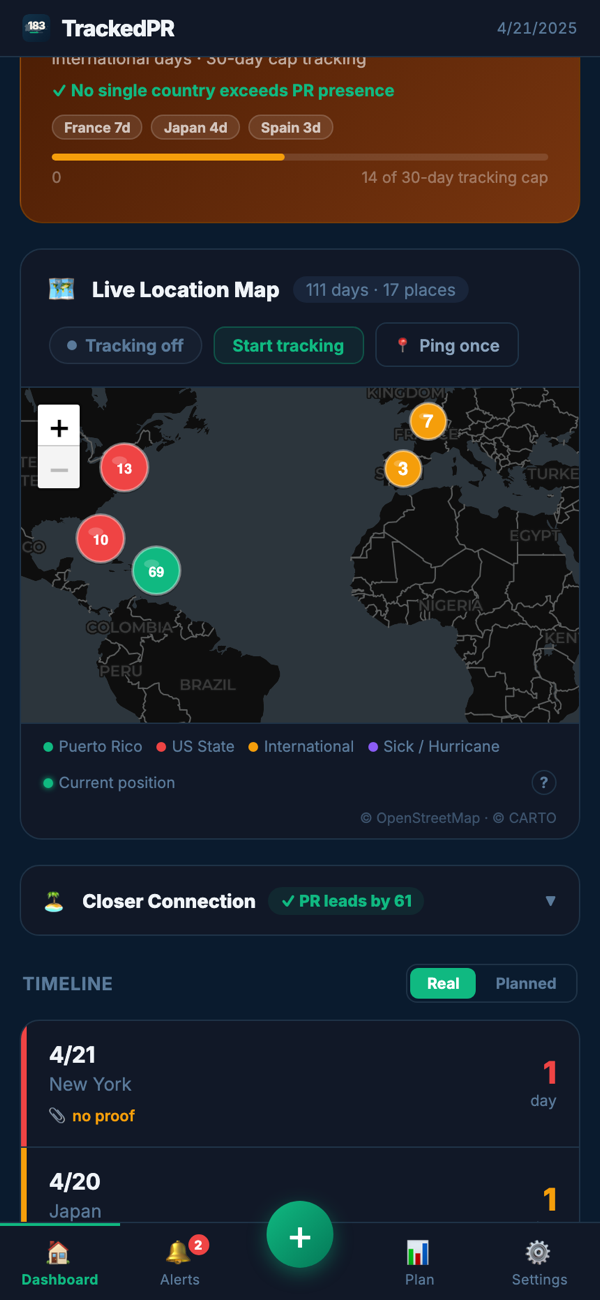
Every place you've been, mapped
Automatic, battery-light location detection logs where you were each day on a live map: Puerto Rico, the mainland, or abroad. And every bit of it stays on your device.
Three steps, then it runs itself
The record is easiest to build while the year is still happening, which is why it is worth starting today rather than in April.
Log the day, or let it log itself
Battery-light detection records where you were, day by day. Add or correct anything by hand in seconds, and import the year you have already lived rather than retyping it.
Add your own proof on top
The detection stamp is already there. A boarding pass, a receipt or a document gets filed against the day it belongs to rather than dumped in a folder, for the days where you want more than the stamp.
Hand your CPA the finished record
One tap sends a single packet: the day log, the proof attached to those days, and the summaries. Any time of year, not just in April.
Four people this was built for
Puerto Rico is the whole product here, which is what makes it possible to serve each of these properly.
You hold a decree
Already on the island. The evidence file stays current through the year instead of being rebuilt every spring, and the count is there the moment someone asks for it.
You are weighing the move
Not committed to anything yet. See the documents the year would ask of you, find out how the tracking actually feels, and watch where a move date lands against 183, before you sign a lease.
You kept a place on the mainland
A house in New York, a business in Florida, a month in Spain. Those days belong to the same picture as the island ones, and they stay in one record rather than three.
You advise Act 60 clients
There is no advisor login, and there is no client roster. The records belong to your client and stay on their device. What changes is what lands in your inbox: a consistent packet from anyone you point at it, instead of a shoebox of screenshots and remembered dates.
A 43-item closer-connection library, not a blank page
Counting days is the easy half. The closer-connection question asks where your life actually is, and that is answered with documents. TrackedPR ships the checklist already written, grouped the way the evidence is gathered.
Identity & Residency
5 itemsHousing
7 itemsFinancial
4 itemsHealthcare
3 itemsCommunity & Lifestyle
9 itemsGovernment & Tax
10 itemsAddress Updates
5 itemsMark each item not started, in progress or completed, and record where the document lives: uploaded here, linked in your own cloud, or a physical copy in a drawer. The file travels with your day count into the report your CPA receives. It is an organizing tool, not a legal standard: which evidence matters in your situation is a question for your advisor.
Free for one month, then one subscription
Every feature is included in both plans. No tier withholds your evidence file or your CPA report. Worth starting before you move as much as after.
Every account starts with a one-month free trial, whichever plan you choose after it. Subscriptions are billed through your App Store or Google Play account and can be canceled there at any time.
The questions people actually ask
+How does TrackedPR decide a day counts as a Puerto Rico day?
If you were in Puerto Rico at any point on a calendar day, TrackedPR records that day as a Puerto Rico day. You can read the same record two ways: days outside Puerto Rico, which only counts a day elsewhere when you did not touch the island that day, and all touches, which counts every state and country you were in. Switching the view never changes the underlying log; it only changes what you are looking at.
+What about sick days, and hurricane or disaster days?
They are tracked as their own kinds of day rather than being lumped in with ordinary presence, alongside international days and the 30-day international tracking. TrackedPR also supports the 183-day test, the three-year alternative of 549 days, and a full-time student mode with a 60-day threshold.
+Do I have to attach a document to every day for it to count as proof?
No. Every day logged automatically already carries its own stamp: the place resolved to country, state and city, and the local time you were detected there. That stamp goes into your report as its own column, on every one of those days, without you doing anything. Attaching a boarding pass or a receipt is a second layer you add to the days where you want more than the stamp. What TrackedPR does not keep is your precise coordinates. They are used on your device to work out which jurisdiction and timezone you are in, and then discarded, so your report shows where and when without carrying a map of your movements.
+Where is my data stored?
Your location history and residency records stay on your device. They are never uploaded to us and we cannot see them. Your account is only how you sign in, with an email and password or with Google, and it carries nothing but that. You back your records up to your own iCloud or Drive, and they reach your CPA only when you send them.